GB WhatsApp Themes: Download and Install Custom Themes
GB WhatsApp’s theme customization feature sets it apart from official WhatsApp by offering unlimited design possibilities. You can transform your entire WhatsApp interface with custom themes that match your personality and preferences. This complete guide shows you how to download, install, and create stunning themes for GB WhatsApp absolutely free.
Why GB WhatsApp Themes Are Popular
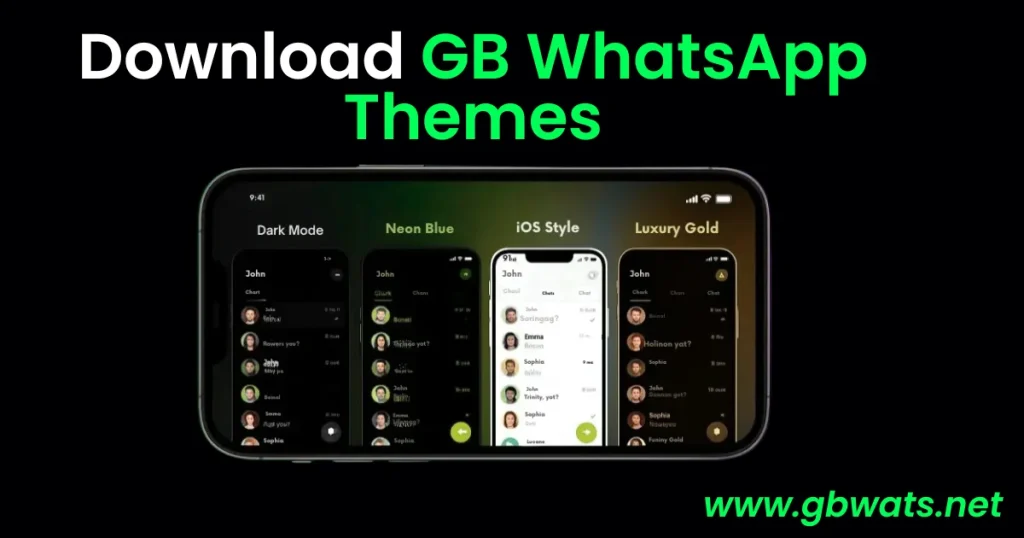
Official WhatsApp offers only dark and light mode options, leaving users craving more customization freedom. GB WhatsApp themes allow you to change every visual element, including chat backgrounds, bubble colors, fonts, and icon styles. Thousands of pre-designed themes are available covering every aesthetic from minimalist designs to vibrant artistic creations.
Theme customization makes your messaging experience truly personal and enjoyable. You can match themes to your mood, seasonal preferences, or favorite colors instantly. The variety ensures you never get bored with your WhatsApp interface appearance.
Understanding GB WhatsApp Theme System
GB WhatsApp themes are XML files that contain color codes, design specifications, and styling instructions for the application. These lightweight files typically range from 50KB to 500KB in size. The app reads theme files and applies the styling across all interface elements automatically.
Themes can modify chat bubble colors, background wallpapers, header colors, font styles and sizes, icon appearances, and status bar designs. Advanced themes even include custom animations and sound effects for notifications. The theme system is entirely non-destructive, meaning you can switch themes anytime without affecting your messages or data.
Where to Download GB WhatsApp Themes
Official GB WhatsApp Theme Store
GB WhatsApp includes a built-in theme store accessible directly from the settings menu. The store features hundreds of verified themes organized by categories like Dark, Light, Nature, Abstract, and Minimalist. All themes in the official store are tested for compatibility and safety with the latest GB WhatsApp version.
Access the theme store by opening GB WhatsApp Settings, tapping on Themes, and selecting Download Themes. Browse through categories or use the search function to find specific theme styles you prefer.
Third-Party Theme Websites
Several dedicated websites offer extensive GB WhatsApp theme collections with unique designs not found in the official store. These sites typically provide preview images and detailed descriptions before downloading. Popular theme websites include GBMods, WhatsTheme, and ThemeGalaxy, though availability may vary by region.
When downloading from third-party sources, verify the website’s reputation through user reviews and community feedback. Avoid sites with excessive pop-up ads or suspicious download links that may contain malware.
Community Theme Creators
Many talented designers share custom GB WhatsApp themes through social media platforms and messaging groups. Telegram channels and Facebook groups dedicated to GB WhatsApp themes offer exclusive designs created by community members. These themes often feature trendy designs inspired by popular culture, games, and movies.
Join reputable GB WhatsApp community groups to access exclusive theme collections and receive updates when new themes are released. Always scan downloaded files with antivirus software before installation for safety.
How to Download and Install GB WhatsApp Themes
Step 1: Backup Your Current Theme
Before installing new themes, back up your existing theme settings in case you want to revert later. Open GB WhatsApp Settings and navigate to the Themes section. Tap on Backup Theme to save your current configuration as an XML file in your device storage.
Step 2: Download Your Chosen Theme
Visit your preferred theme source and select a theme you like from the available collection. Tap the Download button and wait for the theme file to save to your device. Theme files usually download to your Downloads folder with the .xml extension.
Note the theme file name and location for easy access during installation. Some themes may come as ZIP files requiring extraction before use.
Step 3: Install the Theme in GB WhatsApp
Open GB WhatsApp and go to Settings, then tap on Themes to access the theme management interface. Select the “Load Theme” or “Install Theme” option from the menu. Navigate to the location where you downloaded the theme file and select it.
GB WhatsApp will preview the theme showing how it will look before final application. Review the preview carefully to ensure the theme meets your expectations and displays correctly.
Step 4: Apply and Activate Theme
After reviewing the preview, tap “Apply Theme” or “Activate” to implement the new design across your GB WhatsApp interface. The application will close briefly and restart automatically to apply theme changes completely. Wait a few seconds for the theme to load fully before using the app.
Check different sections like chat lists, individual conversations, and settings pages to verify the theme is applied correctly everywhere. Some themes may take longer to fully load depending on their complexity and file size.
Creating Custom Themes for GB WhatsApp
Advanced users can create personalized themes from scratch using GB WhatsApp’s built-in theme editor. The editor allows you to customize individual elements like chat bubble colors, background images, and text colors. You can start with an existing theme and modify specific elements to create your unique design.
Access the theme editor through Settings > Themes > Theme Editor. The interface shows all customizable elements organized by categories such as Header, Chat Screen, and Status. Tap any element to change its color, transparency, or appearance using color pickers and sliders.
Save your custom theme with a unique name for future use or sharing with friends. Export the theme as an XML file that others can install on their GB WhatsApp applications.
Popular Theme Categories and Styles
Dark and AMOLED Themes
Dark themes reduce eye strain during night usage and save battery life on AMOLED displays. Pure black backgrounds with contrasting text colors provide excellent readability in low-light conditions. Popular dark themes include Midnight Black, Dark Carbon, and Shadow Blue variations.
Colorful and Vibrant Themes
Bright, colorful themes energize your messaging experience with bold color combinations and gradient effects. These themes feature rainbow gradients, neon colors, and artistic patterns that stand out. Trending colorful themes include Neon Dreams, Rainbow Fusion, and Candy Pop designs.
Minimal and Clean Themes
Minimalist themes focus on simplicity with subtle colors, clean lines, and distraction-free designs. These themes are perfect for professional use and users who prefer understated elegance. Popular minimal themes include Pure White, Simple Grey, and Clean Material styles.
Themed Collections
Many theme creators design collections inspired by specific topics like nature, space, sports teams, or celebrities. Seasonal themes for holidays, festivals, and special occasions are also widely available. These themed collections allow you to express interests and celebrate occasions through your WhatsApp interface.
Managing Multiple Themes
GB WhatsApp allows you to save multiple themes and switch between them instantly without re-downloading. Create a theme collection folder in your device storage to organize downloaded themes efficiently. Name themes descriptively so you can identify them easily when switching.
The app remembers your last five applied themes for quick access through the Recent Themes section. You can favorite preferred themes to keep them readily available without searching through your entire collection.
Troubleshooting Theme Installation Issues
Theme Not Applying Correctly
If a theme displays incorrectly with missing colors or broken elements, it may be incompatible with your GB WhatsApp version. Download the latest version of both the theme and GB WhatsApp application. Outdated themes designed for older app versions often cause display problems.
Clear GB WhatsApp cache through Settings > Storage > Clear Cache before reapplying the theme. This removes conflicting data that may interfere with proper theme loading.
Theme File Not Recognized
Ensure the theme file has the correct .xml extension and isn’t corrupted during download. If the file is compressed in ZIP or RAR format, extract it first before attempting installation. Some browsers add additional extensions like .xml.txt which must be removed for proper recognition.
Verify that you’re selecting the theme file from the correct storage location. GB WhatsApp only recognizes themes stored in accessible directories, not protected system folders.
Frequently Asked Questions
Can I use official WhatsApp themes in GB WhatsApp?
No, official WhatsApp doesn’t support custom themes, and its default themes are not compatible with GB WhatsApp’s theming system. GB WhatsApp uses a completely different theme format.
Do themes affect GB WhatsApp performance?
Most themes have minimal impact on performance, though extremely complex themes with many custom elements may slightly slow older devices. Standard themes run smoothly on all modern Android devices.
Can I share my custom themes with others?
Yes, export your custom theme as an XML file and share it through any file-sharing method. Recipients can install it on their GB WhatsApp following the standard installation process.
Are GB WhatsApp themes safe to use?
Themes from the official GB WhatsApp store and reputable sources are generally safe. Always scan downloaded theme files with antivirus software and avoid suspicious sources to prevent malware risks.
Conclusion
GB WhatsApp themes provide unlimited customization possibilities that transform your messaging experience into something uniquely yours. Downloading and installing themes takes just minutes while offering dramatic visual improvements. Explore the vast theme library available and switch designs whenever you want a fresh look for your WhatsApp interface.